Customer details scattered across emails and chats?
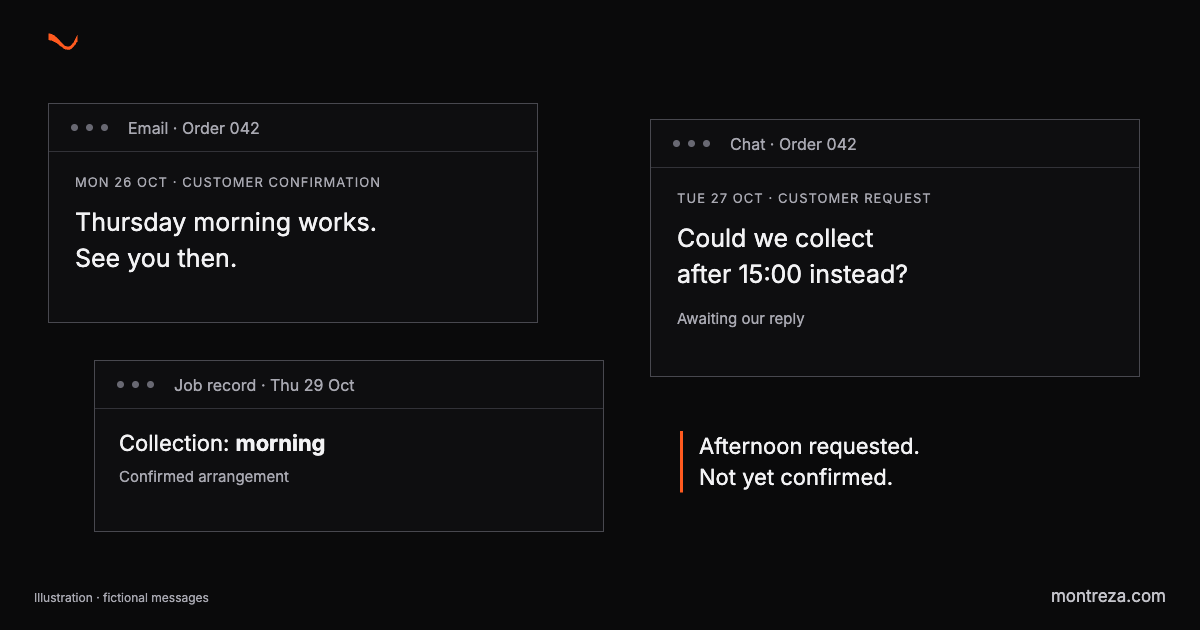
Order 042 has two collection times: Thursday morning in the job record, after 15:00 in the customer’s chat.
That’s our fictional example. Nobody has deleted a message or forgotten to write something down. You can find both times, but you still need to work out which one your team should use.
Putting the messages in one inbox would help you find them. It wouldn’t settle what you’ve agreed with the customer.
The newest message isn’t always the agreement
Here’s the history of Order 042, made up to show the difference:
| Record | What it says |
|---|---|
| Email, Mon 26 Oct, 09:10 | “Thursday morning works. See you then.” |
| Chat, Tue 27 Oct, 14:20 | “Could we collect after 15:00 instead?” |
| Job record for Thu 29 Oct | Collection: morning |
You haven’t replied to the afternoon request. The person preparing the order sees the morning slot. Your colleague opens the chat and assumes the collection has moved.
Both have found a genuine customer message.
The missing detail is whether anyone accepted the change. A summary saying “Thursday afternoon collection” would hide that gap. You need something more useful: “Morning confirmed; afternoon requested, awaiting our reply.”
Now you know what remains to be done.
Follow one change through your records
Pick a completed job where the customer changed something after the original agreement. You need the actual messages, not a colleague’s recollection of what probably happened.
Find the first agreement, the request to change it and your response. Then open the record the person doing the work would have used.
Check whether you can establish the final arrangement without asking the customer again.
If you can’t find an acceptance, write “confirmation not found”. You haven’t proved that nobody replied. You have found something you can’t establish from the available records.
Keep a note of the searching and internal calls needed to reconstruct the job, including who had to stop their own work to find the answer and whether the customer was left waiting while you checked. Try a few more. You’re looking for a repeated gap that deserves attention, rather than an excuse to replace every tool you use.
Ask AI for the agreement and the open request
An assistant could help prepare this view from messages you supply. Start with fictional or anonymised material you’re allowed to share. Keep the original wording and timestamps so you can check its answer.
Try this prompt:
Make a short customer update from these messages. Separate confirmed arrangements, requested changes awaiting agreement, and unanswered questions. Beside each item, quote the supporting line and its timestamp. Don’t treat a newer request as an accepted change. Show disagreements. Don’t update any booking or send a reply.
For Order 042, the expected answer keeps “Thu 29 Oct, morning” under confirmed arrangements. The request for collection after 15:00 belongs under awaiting agreement, supported by the chat dated 27 Oct at 14:20.
Check that distinction yourself.
Then add a reply accepting the change and try again: the afternoon should become confirmed, with that reply as its source. If it still shows both times as current, or chose the afternoon before you supplied the acceptance, you haven’t got a reliable working note yet.
This is a small test of a useful job. You don’t need to connect your whole business to try it.
Fix the place where the work stops
If your team accepted the change but never updated the job record, a simple update step may be enough. If you repeatedly search several conversations to reconstruct each job, a customer summary may be worth testing.
And if nobody has answered the request, someone needs to respond. Collecting more information won’t do that for you.
This is where a Montreza audit starts: follow the actual work, identify where it breaks and establish whether you’re dealing with repeated effort, delayed answers or unresolved requests. The report separates quick fixes from work that needs building. An assistant is one possible outcome.
When a customer changes a request, where can your team see what was finally agreed?